
Skip to content
CERTYX CERTIFICATE LIFECYCLE MANAGEMENT

Certificate lifecycle intelligence

Full control over your certificates. Before shorter cycles become a problem.

CERTYX discovers certificates, assesses real risk and guides your team through safe renewal, with evidence at every stage.

shop.example.com TLS certificate · Valid
legacy.example.com TLS certificate · Expired
pay.example.com TLS certificate · Expiring
Peaks represent hosts, summit points represent certificates. Illustrative connections and example data.
Private keys stay with you Hosted in the EU Scroll to see the system

How CERTYX helps

The date says why. The console shows how.

What expires and when, who owns it and what needs a decision, in one view.

The CERTYX overview of certificates and their expiry
The CERTYX console with sample data.

Real problems

Outages start with a certificate nobody knew about.

Expiry is rarely a technical surprise. It is an inventory, ownership and process problem.

Choose a situation. Follow the response.

CERTYX: agents scan approved ranges on every TCP port, and cloud vaults are imported read-only.

Outcome: a visible inventory inside the approved scope.

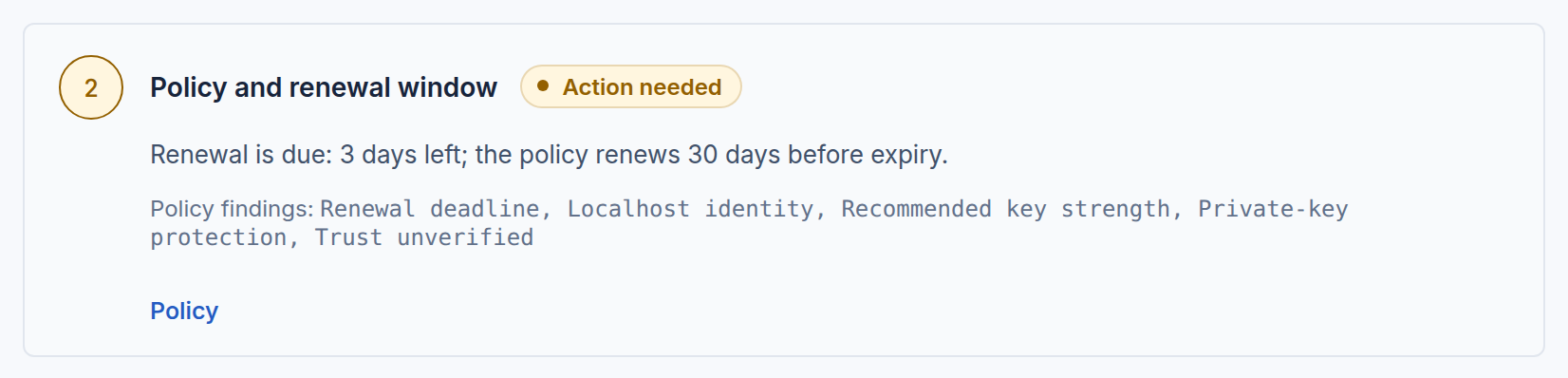
Renewal readiness of a newly discovered certificate: observed endpoint, policy findings and the missing execution target

CERTYX: every certificate has an owner, a service and a notification group.

Outcome: an accountable team and a notification route.

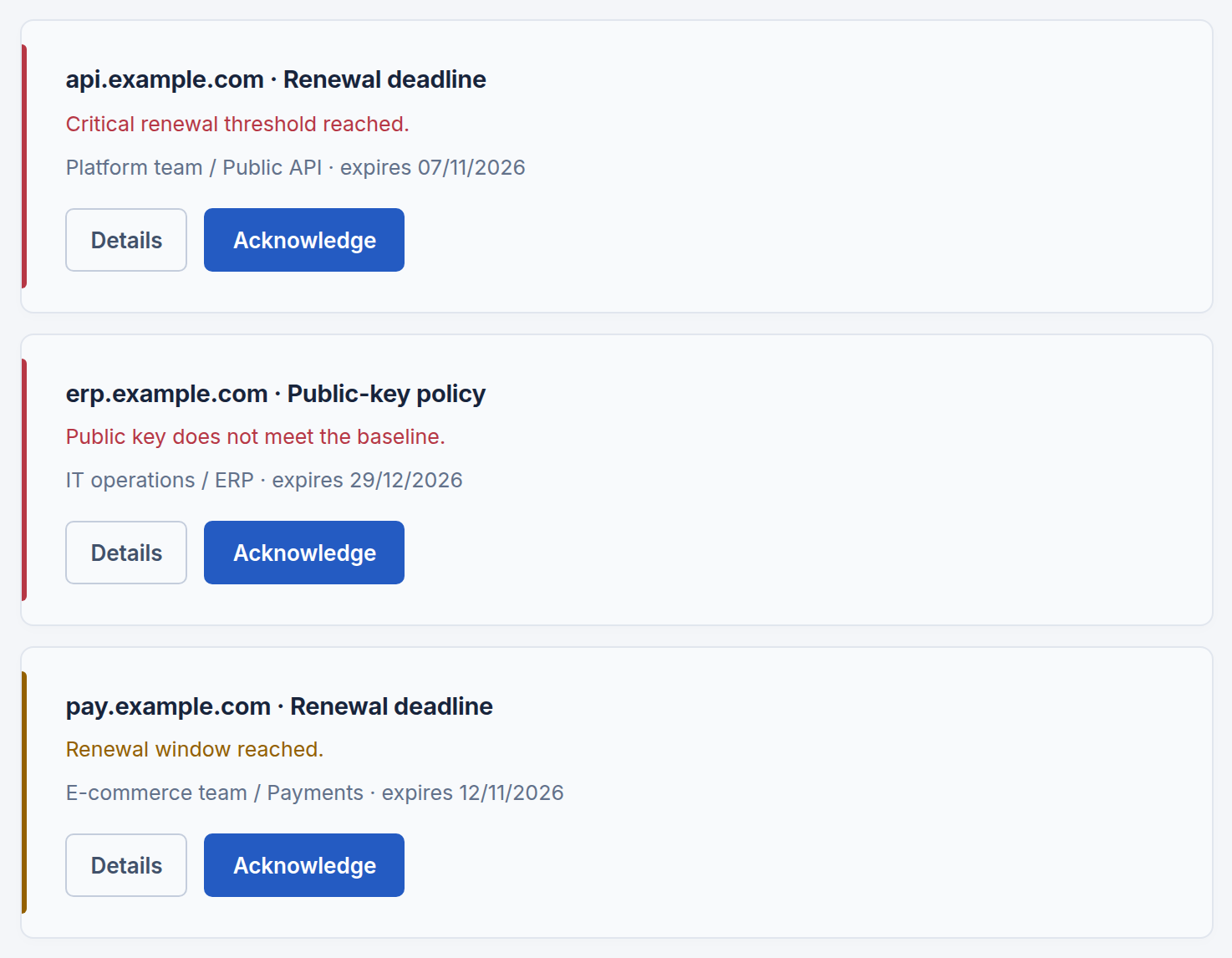
Certificate risks with the owner and service of each finding

CERTYX: renewal runs through approval, installation and an independent check of the certificate actually served.

Outcome: a recorded installation and endpoint verification.

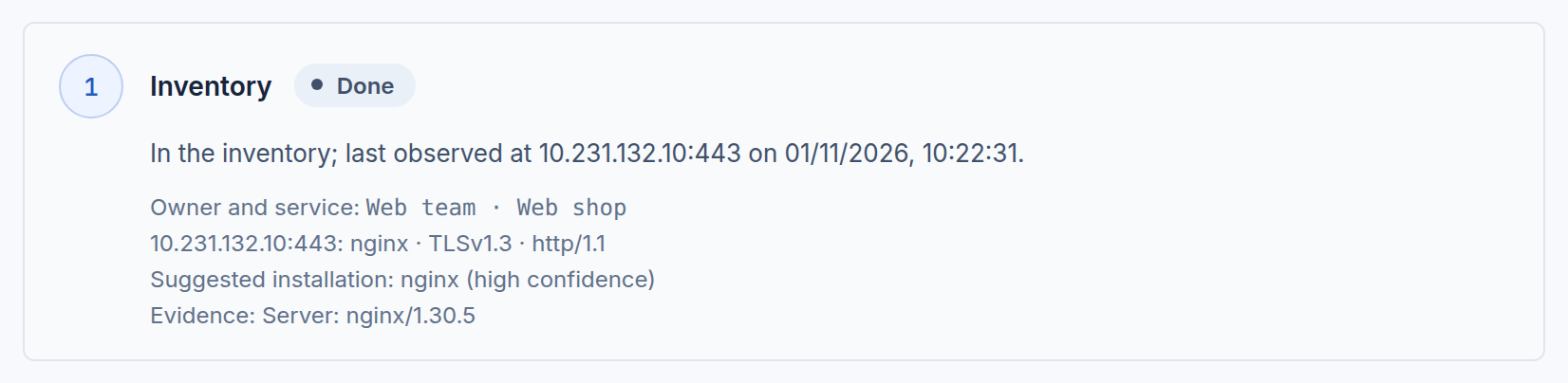
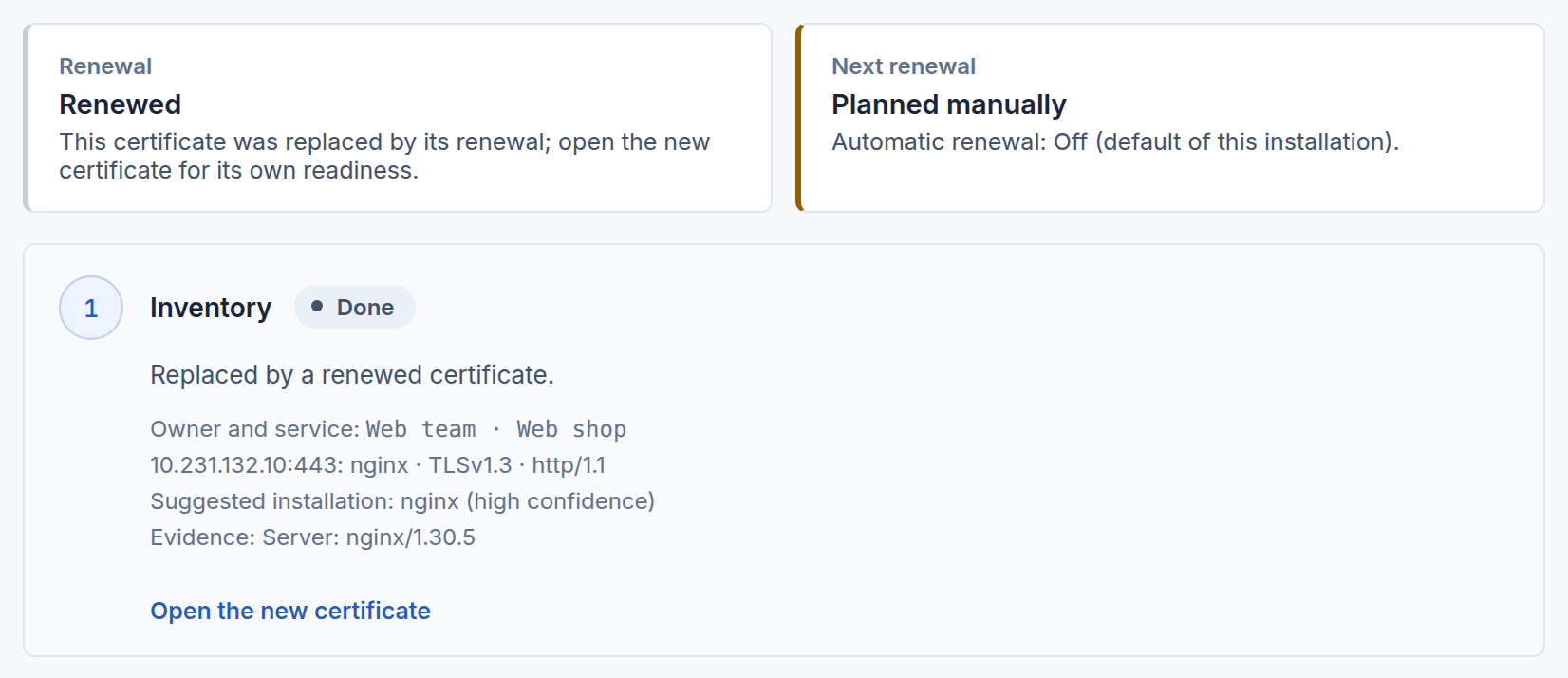
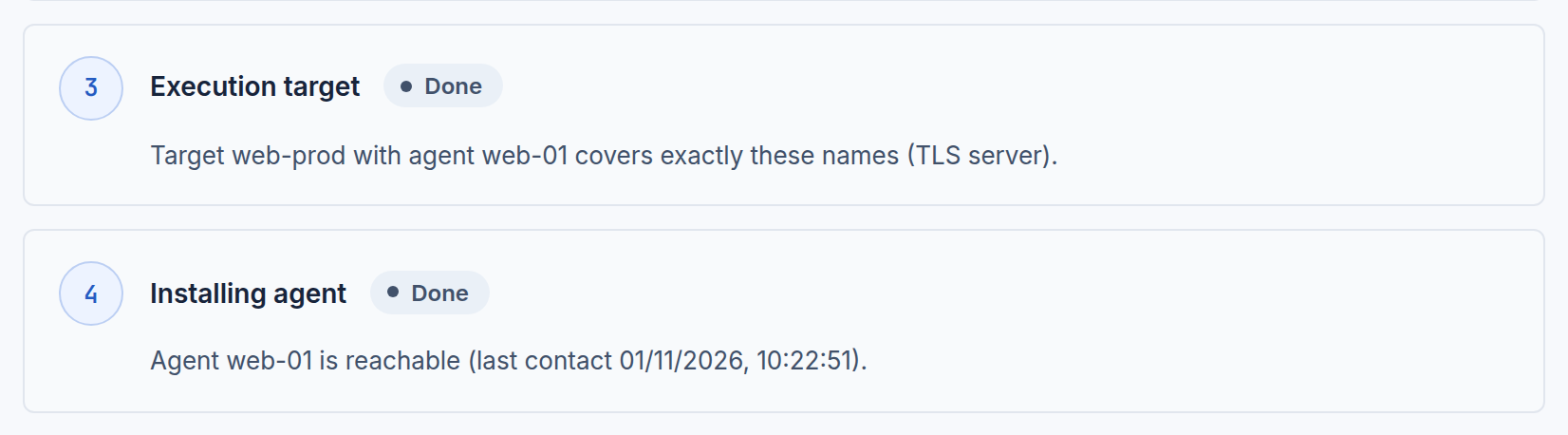
Renewal readiness of a certificate after a verified renewal, every step done

How it works

A lifecycle you can audit, step by step.

Five stages, each with its evidence. Renewal readiness shows for every certificate which stage is done and what is still missing.

The CERTYX console with sample data.

Discover

Scan approved ranges, import PEM files or collect from cloud vaults.

  • Every TCP port in approved IPv4 ranges
  • PEM file import
  • Read-only import from cloud vaults

Result · a known certificate in the inventory

Renewal readiness of a newly discovered certificate: observed endpoint, policy findings and the missing execution target

Assess

Policy findings and business context show what matters first.

  • Expiry thresholds of your TLS policy
  • Minimum key size and weak signatures
  • Service and owner of each certificate

Result · findings against the organization’s policy

Renewal readiness of a newly discovered certificate: observed endpoint, policy findings and the missing execution target

Renew

Due renewals run automatically within guardrails, or wait for a second administrator where you require approval.

  • Automatic renewal within guardrails
  • Four-eyes approval where you require it
  • ACME, DigiCert CertCentral or Vault PKI

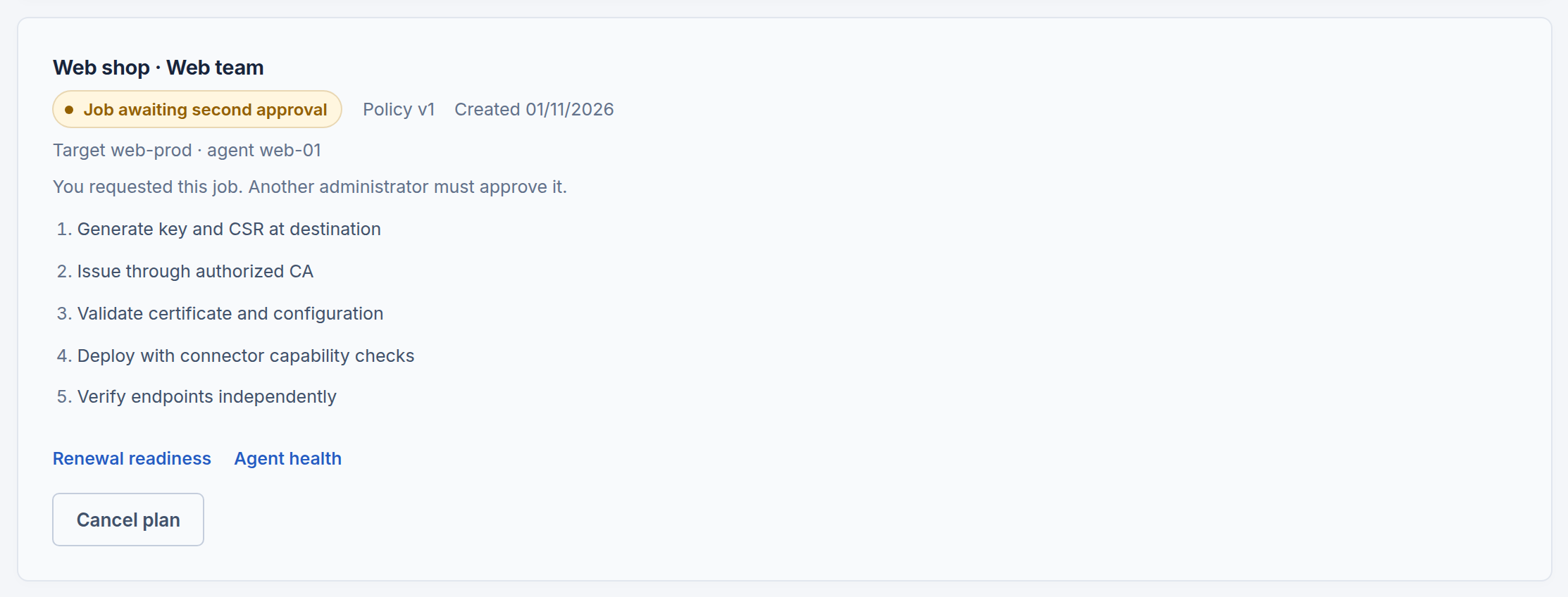
Result · a scoped, approved renewal plan

Renewal readiness of a certificate after a verified renewal, every step done

Execute

The agent creates the key locally, obtains the certificate and installs it.

  • Key generated where the certificate is used
  • Connectors for Nginx, Apache, HAProxy, Tomcat, Kubernetes and more
  • SSH relay for hosts without an agent

Result · installation reported by the agent

Renewal readiness of a certificate after a verified renewal, every step done

Verify

CERTYX checks the certificate actually served and notifies the owners.

  • Check of the certificate actually served
  • Inventory updated with the new certificate
  • Owners notified

Result · independent verification and updated inventory

Renewal readiness of a certificate after a verified renewal, every step done
A real renewal in the sample environment: Vault PKI, an agent and Nginx.

Security

Your organization. Your boundaries.

Isolation, explicit roles and evidence are designed in, not added later.

Security by design

The most sensitive material never reaches us: private keys and CA credentials stay with you, every organization's data is kept apart, and every privileged action, including ours, leaves evidence you can see.

Read the security overview Download the brochure (PDF)

Your infrastructure

  • On-premises
  • Cloud

CERTYX agent

CERTYX platform

  • CERTYX API
  • Data isolation Dedicated database, own roles
  • Roles and audit Hash-chained security journal
  • Encryption TLS in transit, encrypted secrets and backups

Managed certificate private keys stay in your infrastructure

Enrolled agents communicate with the CERTYX API through mutual TLS. The platform uses a dedicated database for your organization; managed certificate private keys remain in your infrastructure.

01 / Key custody

Private keys stay on your side

Certificate keys are generated locally. Public certificates, CSRs and operational metadata reach the platform; private key material does not.

Show the controls
  • Private keys of managed certificates are generated and kept in your infrastructure and never sent to CERTYX
  • Stored secrets are encrypted, bound to your organization and never returned by the API
  • AI Trust Analyst only when your administrator enables it: read-only, sources cited, private keys and secrets never sent

02 / Data separation

An explicit boundary for each organization

Dedicated customer databases, database roles and organization-bound secret encryption keep access tied to the correct tenant.

Show the controls
  • Separate database and database roles for every organization, with forced row-level security, also in the shared platform layer
  • Hosted in the EU (AWS Frankfurt), TLS on every connection, database, disks and secrets on dedicated AWS KMS keys, daily encrypted write-once backups and a cloud audit trail

03 / Identity and access

Every connection has an identity

Enrolled agents authenticate with mutual TLS. People use explicit roles, strong sign-in and revocable sessions; privileged operator access requires additional controls.

Show the controls
  • Agents use mutual TLS with enrolled identities and outbound connections only; signed packages and updates are verified
  • MFA for administrators, phishing-resistant passkeys, company sign-in with Microsoft Entra ID, Okta, OpenID Connect or SAML 2.0, and SCIM
  • Sign-in limited to your networks if you choose, short sessions and a session list with immediate revocation
  • Platform operators work with least-privilege roles and step-up confirmation; access to your organization needs your approval or an audited break-glass

04 / Change control and evidence

A change needs an observable result

Renewal follows configured approval rules, deployment and independent verification. Audit and security events explain who acted and what happened.

Show the controls
  • Auditor, Operator and Admin roles; configurable automatic or four-eyes approval for renewals, independent verification and rollback
  • Hash-chained security journal, anchored hourly with signatures in write-once storage, that also shows every platform operator action on your organization
  • SIEM export to Splunk, IBM QRadar, Microsoft Sentinel, Elastic, ArcSight, Cribl and OpenTelemetry in CEF, LEEF, RFC 5424, NDJSON, OCSF, ECS and Splunk CIM over TLS, with per-destination event shaping and nothing lost silently

Analytical advantage

Not another alert. A decision with a reason.

Most tools count days. CERTYX looks at dependencies, owners, services and the actual result of a deployment.

Area of analysis CERTYX Typical tools
Discovering certificates Recurring scan of the approved network ranges Import or a manual list
Risk assessment Service, owner and policy context Expiry date
Renewal verification The certificate actually served in production Task status
Private material Stays in your infrastructure Often centralized

A conclusion instead of noise · example api.example.com expires in 6 days, protects the public API and has no approved renewal plan.

Platform

One operational view, from discovery to verified renewal.

Every view below is the CERTYX console, captured with sample data.

TLS discovery

Agents inside your network scan approved IPv4 ranges on any TCP port, resume interrupted scans and report progress. Exclusions and concurrency stay under your control.

Before you approve a network profile, the console shows how many addresses and ports one pass covers and how long it takes at the approved rate.

Network profile of a discovery agent with approved ranges, exclusions and the scope estimate

Policy assessment

Every certificate is checked against expiry thresholds, minimum key size and weak signatures, with an explanation of each finding.

Read-only import from Azure Key Vault, AWS ACM and Google Certificate Manager using your own CLI session. No cloud credentials are entered in CERTYX.

Certificate inventory with expiry, policy status, owners and services

Business impact

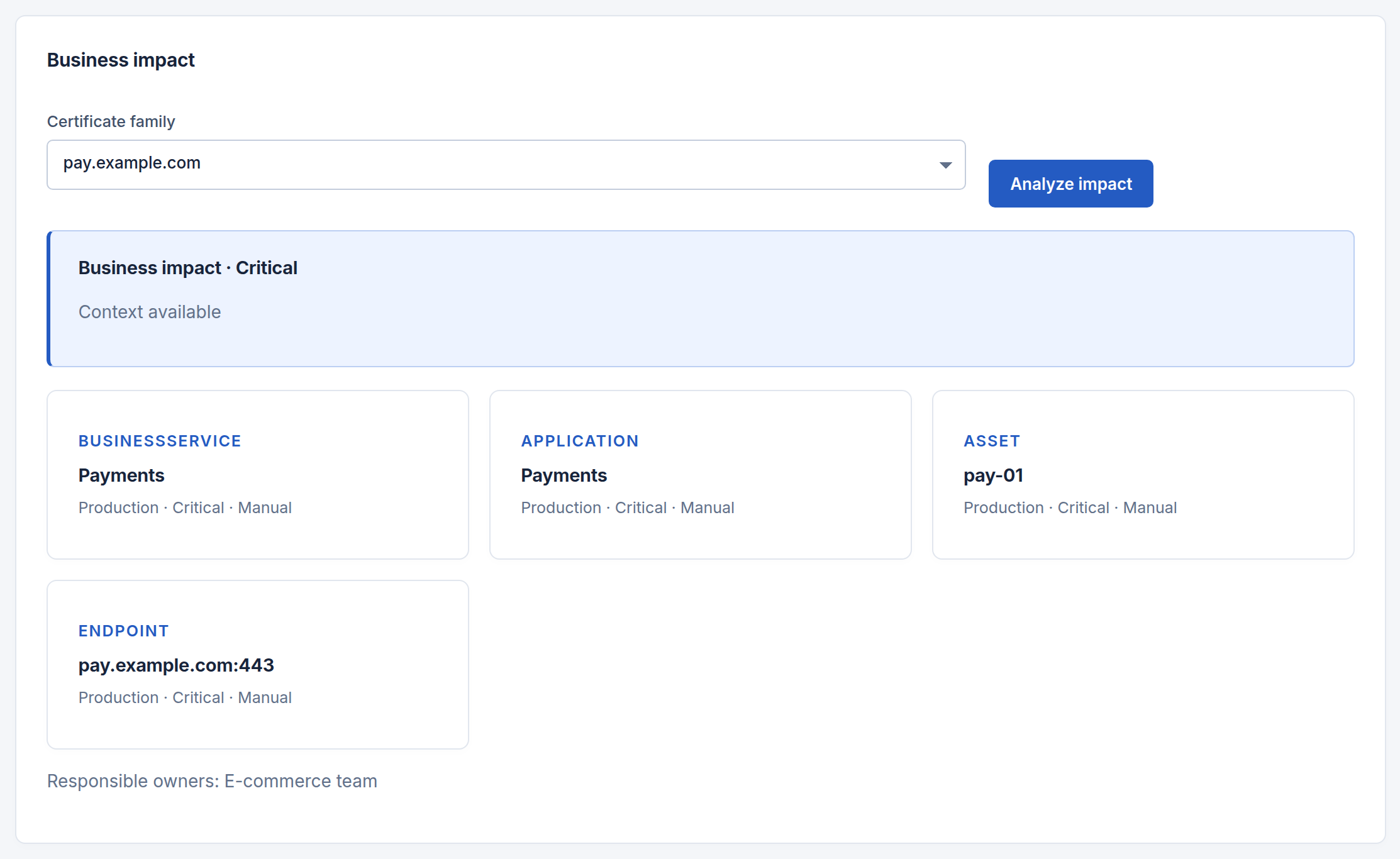
Link certificates to hosts, applications and services. See who is responsible and what stops if a certificate fails.

Notification groups receive expiry and renewal messages for the certificates assigned to them, delivered through your SMTP server.

Trust graph with the business impact of a certificate family: services, owners and dependencies

SSH certificates

OpenSSH certificate inventory, approved signing profiles and revocation lists distributed by agents.

A signing profile takes effect only after a second administrator approves it.

SSH automation with managed signing profiles and their approval state

Autonomous remediation

Policies react to expiring or weak certificates, replacements and offline agents: dry run, proposals for four-eyes approval, or automatic approval within guardrails. Every decision is logged with its reasons.

Subscription feature

Autonomous remediation policies in dry-run mode with their recorded decisions

From the first sign-in to planned renewals

Ten steps recorded in the CERTYX console with sample data: securing the account, adding the team, bringing in certificates, connecting agents, acting on alerts, planning renewals and sending events to your SIEM.

The video shows each step in the console with sample data. Select a step to jump to it. Turn on the sound to hear the narration.

Screenshots and video use sample data.

Subscription feature

Ask your certificate estate a question.

The AI Trust Analyst answers in plain language and explains findings, from your organization's data only.

  • Read-only

    Creates, changes, approves and deletes nothing.

  • With sources

    Every answer names the records it comes from.

  • Opt-in

    An administrator enables it for the organization; keys and secrets are never sent.

Sample questions

Interactive demonstration · sample records

Which production certificates expire in the next 30 days, and who has to act?

AI Trust Analyst

4 production certificates expire within 30 days.

  • api.example.com 5 days left Public API · Platform team
  • pay.example.com 10 days left Payments · E-commerce team
  • shop.example.com 18 days left Online shop · E-commerce team

Also in the answer: vpn.example.com (26 days).

The first one is already below the critical threshold of your TLS policy. You create its renewal plan directly from the certificate; where four-eyes approval applies, a second administrator approves the job.

Who owns the service?

AI Trust Analyst

Action · involve the service owner

Risk has a service and an owner.

In the sample estate, pay.example.com is linked to Payments and the E-commerce team. The dependency graph supplies context for deciding who must act.

Certificate
pay.example.com
Service
Payments
Owner
E-commerce team
Finding
Business impact: critical
Trust graph with the business impact of a certificate family: services, owners and dependencies
Source 02 · dependency graph and ownership

How do I confirm the renewal result?

AI Trust Analyst

Decision · verify before accepting success

A result needs evidence from the endpoint.

The sample renewal shows a completed plan, agent installation and independent endpoint verification. Issuance alone does not establish this result.

Certificate
web.example.com
Service
Web shop
Owner
Web team
Finding
Endpoint independently verified
Renewal readiness of a certificate after a verified renewal, every step done
Source 03 · renewal readiness and observed verification
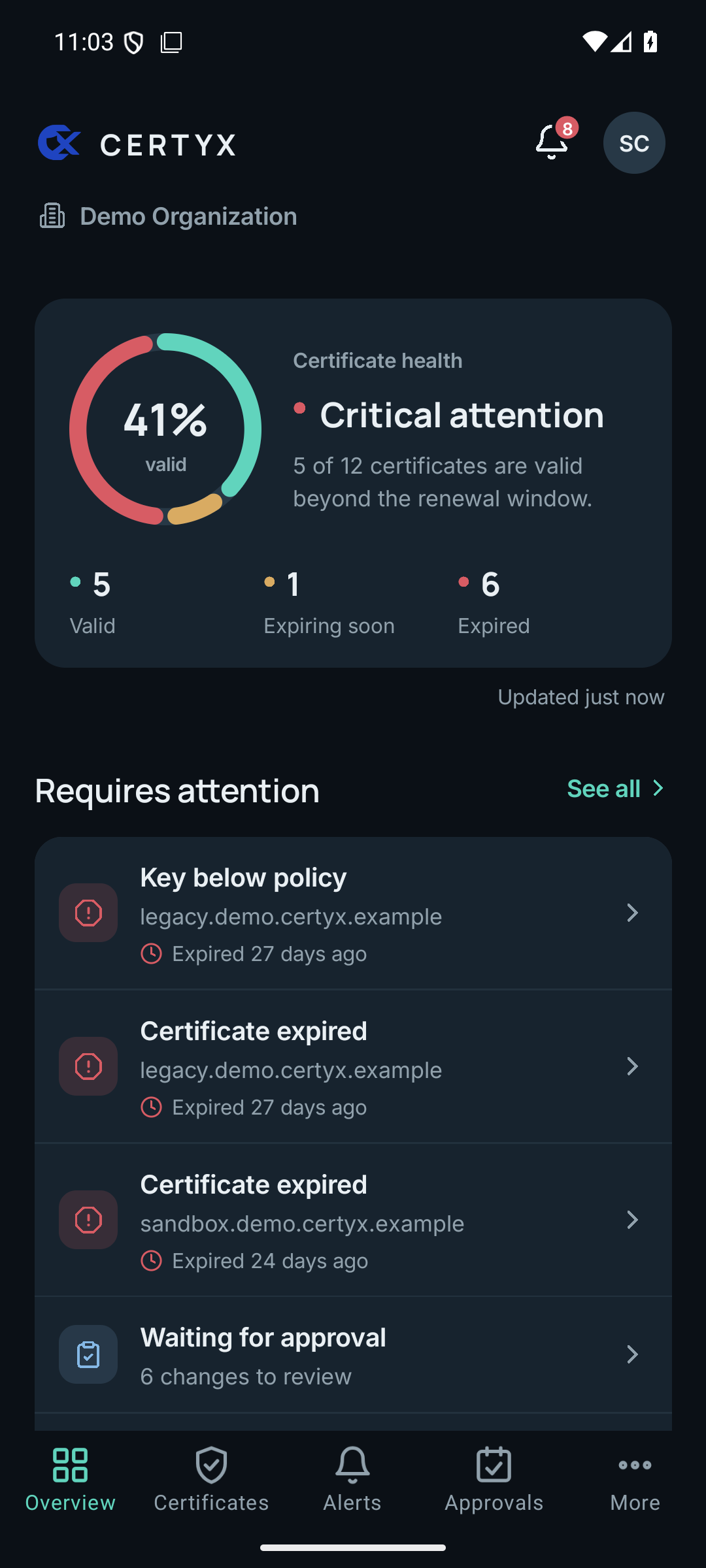
CERTYX Mobile overview with certificate health, alerts and agent status
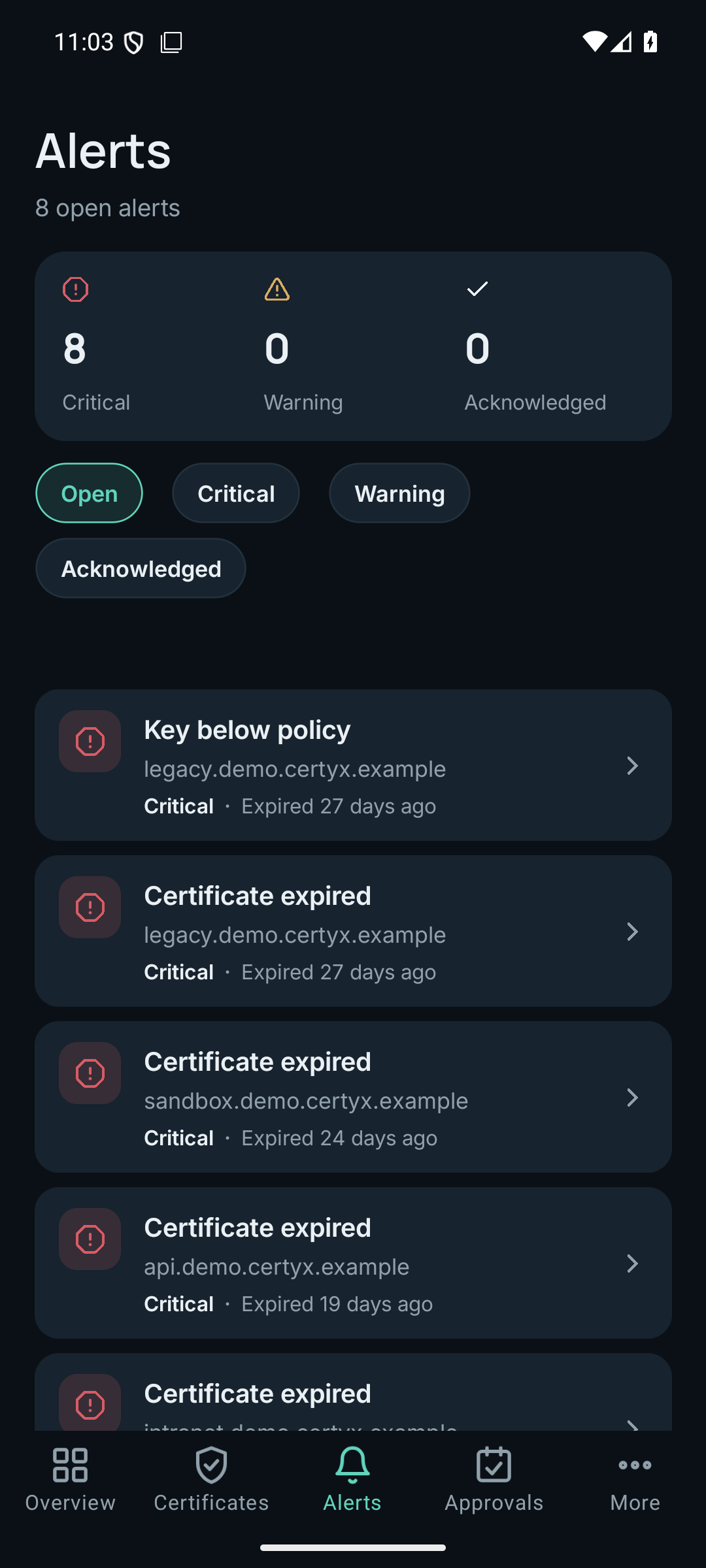
Actual CERTYX Mobile alerts view
Actual app views with a demonstration organization.

Mobile

Approve and respond from anywhere.

CERTYX Mobile brings certificate health, alerts and supported approvals to authorized devices, within each user’s permissions.

iOS · Apple Business Manager

Android · managed Google Play

Private distribution for your organization — not listed in the public stores.

How access works

  • Distribution through your organization's private store.
  • Device authorization comes first.
  • The same sign-in and MFA as in the browser.
  • An administrator can revoke a device immediately.
Access, on your terms.

Mobile security

Access, on your terms.

From the first activation to a lost device. See how access is granted, protected and withdrawn.

Activation

Can anyone download the app from the App Store or Google Play?

Store distribution is agreed with your organization. Apple Business Manager and managed Google Play require organization-specific configuration. Installing the app alone does not grant access: the device must be activated and the user authenticated.

If someone installs the app, can they see our data?

No. Before anything else the app must be authorized with a one-time code that only your administrator can generate. After that every user still signs in with their own CERTYX account and MFA (an account without an authenticator app is refused until its user enables MFA in the web console), or with your company sign-in.

Device identity

Do Face ID, fingerprint or PIN replace the password and MFA?

No. They only unlock credentials stored encrypted on the device. The app then signs in with them as usual, and the MFA code is still required.

Why is a copied session not enough to use the service?

The app creates a key in the device's secure hardware that cannot be exported, and signs every request with it. The server keeps only the public key, so a session token copied to another device is refused.

Access control

What happens when a phone or tablet is lost?

Your administrator revokes the device under Access & security → Mobile devices. The server checks the device on every request, before sign-in, so the app stops working at once. Credentials saved for quick sign-in stay encrypted and need the PIN or biometrics.

Can we sign in with Microsoft Entra ID or Okta?

Yes, on the web and in the app. Your administrator configures Microsoft Entra ID, Okta, another OpenID Connect provider or SAML 2.0 under Access & security → Company sign-in and verifies your e-mail domain.

Everyday operation

What do notifications contain?

Only a general message, for example that a critical alert needs attention. Certificate names and other details are shown in the app after sign-in, never in the notification.

How do updates work?

At start the app checks for a newer version and asks before opening your organization's store to update. When a version is no longer supported, it asks you to update before continuing.

Integrations

Works with the tools you already run

CERTYX connects to your SIEM, certificate authority, servers, clouds, sign-in and on-call tools.

Your SIEM, your licence budget

You choose the fields and size of each event. The full record stays in your journal and archive.

SIEM and log platforms

  • Splunk Enterprise and Splunk Cloud
  • IBM QRadar
  • Microsoft Sentinel
  • Elastic Security
  • ArcSight
  • Cribl Stream
  • Grafana Loki and Alloy
  • OpenTelemetry Collector
  • Amazon Security Lake
  • rsyslog and syslog-ng

Certificate authorities

  • Let's Encrypt and other ACME CAs
  • DigiCert CertCentral
  • HashiCorp Vault PKI
  • AWS Certificate Manager
  • Azure Key Vault
  • Google Certificate Manager
  • Your internal CA

Servers and platforms

  • nginx
  • Apache
  • HAProxy
  • Caddy
  • Traefik
  • Envoy
  • lighttpd
  • Tomcat and Java keystores
  • Microsoft IIS and Windows certificate store
  • Kubernetes secrets
  • Postfix and Dovecot
  • OpenSSH

Cloud discovery

  • Amazon Web Services
  • Microsoft Azure
  • Google Cloud

Sign-in and user provisioning

  • Microsoft Entra ID
  • Okta
  • OpenID Connect
  • SAML 2.0
  • SCIM 2.0

Alerts and on-call

  • Microsoft Teams
  • Slack
  • PagerDuty
  • Webhooks and e-mail

Licensing

Pay for what you manage, not for what you find.

The licence unit is a managed certificate family. Discovery and imports create unmanaged records that use no capacity.

Request a quote

Example

discovered certificates — not counted toward the limit
1,248
managed certificate families — counted in the licence
250

Illustrative numbers, not a customer estate.

How usage is counted

Discovery and imports
Not counted
Renewals and deployments
Same family, no extra usage
Managed certificate families
Licensed capacity

Documentation

Read it before you decide.

Contact

Book a presentation.

We show CERTYX on scenarios like yours. You can also request an offer or a pilot, or ask a question; the sales team answers every request by e-mail.

Already a customer? Your organization administrator provides your account. Sign in to your organization

What can we help with?

Add details (optional) Phone, role, country and reply language

Size your offer

With these answers we can send a priced offer straight away instead of arranging a scoping call first. Rough numbers are fine; you can change everything later.

Plan
Deployment preference
Your preference only: hosted service run by CERTYX, or your own data centre or cloud account. Sales confirms which options fit your plan.
Contract term
Longer terms carry a discount.
Billing and currency
Monthly billing is available for some plans only.
Services
Where are your certificates today?

Public TLS validity schedule

These are requirements of the publicly trusted TLS ecosystem, set by the CA/Browser Forum, not legal regulations. They apply to newly issued certificates; certificates already issued keep working until they expire.

Issued Maximum validity Domain validation reuse

Public TLS and private PKI differ: these limits bind publicly trusted certificates. Certificates from your own private CA follow your policy.

Individual providers may apply stricter limits earlier.

CA/Browser Forum Baseline Requirements Ballot SC-081v3